> For clean Markdown of any page, append .md to the page URL.
> For a complete documentation index, see https://docs.monite.com/llms.txt.
> For AI client integration (Claude Code, Cursor, etc.), connect to the MCP server at https://docs.monite.com/_mcp/server.
# InvoiceDetails component
## Overview
`InvoiceDetails` is a React component that renders the interface for creating a new receivable. It also renders the modal form that displays information about the specified invoice and allows performing various actions on the invoice. You can cancel, delete, issue, and mark an invoice as uncollectible from the `InvoiceDetails` component. You can also send and issue invoices using this component.
## Permissions
To view details of an existing invoice, the entity user must have `read` permissions for the`receivable` object. To create, edit, and delete receivables, they must also have `create`, `update`, or `delete` permissions for the `receivable` object. For more information, see [List of permissions](/api/concepts/authentication#permissions).
## Preview
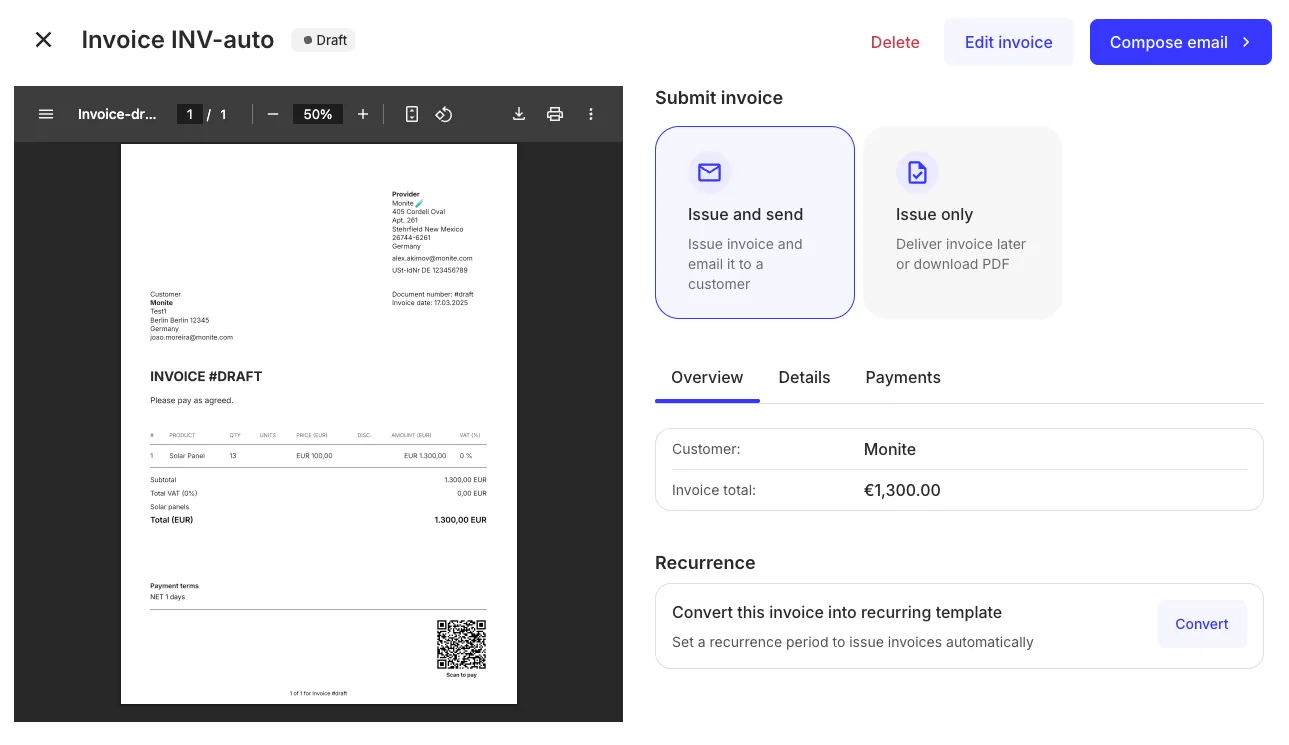
## Usage
Use the `InvoiceDetails` component to create new invoices and view details of an existing invoice. To view details of an existing invoice, use the `InvoiceDetails` component with the `id` prop as shown:
**`React.js`**
```jsx React.js
import { InvoiceDetails, Dialog } from "@monite/sdk-react";
...
// TODO: This component must be rendered within the MoniteProvider wrapper
const InvoiceDetailsPage = () => {
return (
);
};
```
To create a new invoice, import the `InvoiceDetails` component and bring into your application with the `type` prop as shown:
**`React.js`**
```jsx React.js
import { InvoiceDetails } from "@monite/sdk-react";
...
// TODO: This component must be rendered within the MoniteProvider wrapper
const InvoiceDetailsPage = () => {
return
};
```
## Props
| Prop | Type | Description |
| :---------------------- | :------------ | :---------------------------------------------------------------------------------------------------------------------- |
| `id` | `string` | This is a required prop that accepts the UUID of the invoice details to be displayed, issued or updated. |
| `onCancel` | `function` | This callback is triggered after canceling an invoice. It contains one string argument representing the invoice UUID. |
| `onCreate` | `function` | This callback is triggered when a new invoice is created. |
| `onDelete` | `function` | This callback is triggered after deleting an invoice. It contains one string argument that represents the invoice UUID. |
| `onIssue` | `function` | This callback is triggered after issuing an invoice. |
| `onMarkAsUncollectible` | `function` | This callback is triggered after marking the invoice as uncollectible. |
| `type` | `("invoice")` | This prop accepts the type of receivable to be created. |