> For clean Markdown of any page, append .md to the page URL.
> For a complete documentation index, see https://docs.monite.com/llms.txt.
> For AI client integration (Claude Code, Cursor, etc.), connect to the MCP server at https://docs.monite.com/_mcp/server.
# ProductDetails component
## Overview
The `ProductDetails` component renders the interface for creating new products and viewing product information. It displays details of an existing product item and allows a user to edit the product.
## Permissions
To view details of an existing product, the entity user must have `read` permissions for the `product` object. To create, edit, and delete products, they must also have `create`, `update`, or `delete` permissions for the `product` object. For more information, see [List of permissions](/api/concepts/authentication#permissions).
## Preview
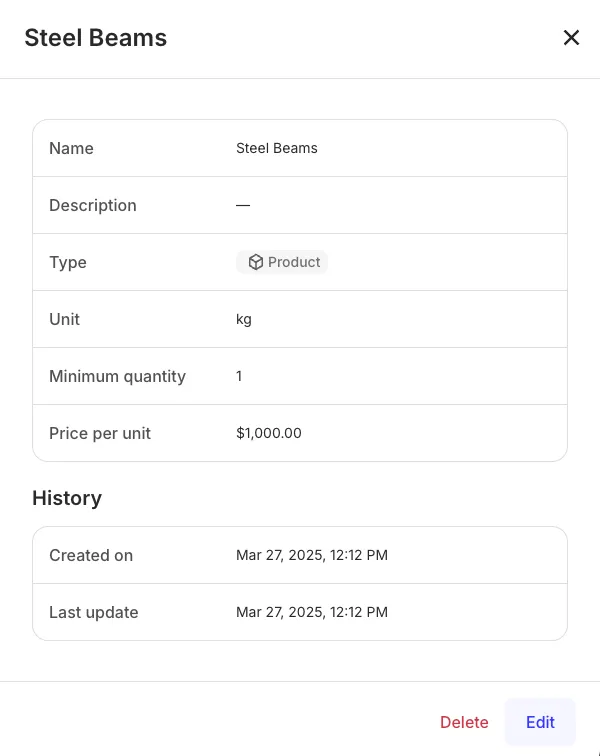
## Usage
You can use the `ProductDetails` component to create, view, edit, and delete details of an existing product. To create a new product, use the `ProductDetails` component without any props as shown:
```jsx
import { Dialog, ProductDetails } from "@monite/sdk-react"
...
// TODO: This component must be rendered within the MoniteProvider wrapper
const ProductDetailsPage = () => {
return (
);
};
```
To view details of an existing product, use the `ProductDetails` component with the `id` prop as shown:
```jsx
import { Dialog, ProductDetails } from "@monite/sdk-react"
...
// TODO: This component must be rendered within the MoniteProvider wrapper
const ProductDetailsPage = () => {
return (
);
};
```
To edit details of an existing product, you must provide the product ID via the `id` prop and set the `initialView` prop to Edit mode.
```javascript
import { Dialog, ProductDetails } from "@monite/sdk-react"
...
// TODO: This component must be rendered within the MoniteProvider wrapper
const ProductDetailsPage = () => {
return (
);
};
```
## Props
| Prop | Type | Description |
| :-------------- | :------------------ | :-------------------------------------------------------------------------------------------------------------------- |
| `defaultValues` | `object` | This object is used to set default form values when creating a new product. |
| `id` | `string` | This is a required prop that accepts the UUID of the product to be displayed. |
| `initialView` | `("edit"\| "read")` | The `initialView` prop determines whether the component is rendered in **Read** or **Edit** mode. Defaults to `read`. |
| `onCreated` | `function` | This callback is triggered when a new product is created. |
| `onDeleted` | `function` | This callback is triggered after a product is deleted. |
| `onEdit` | `function` | This callback is triggered when a product is edited. |
| `onUpdated` | `function` | This callback is triggered when a product information is updated. |