> For clean Markdown of any page, append .md to the page URL.
> For a complete documentation index, see https://docs.monite.com/llms.txt.
> For AI client integration (Claude Code, Cursor, etc.), connect to the MCP server at https://docs.monite.com/_mcp/server.
# Manage quotes
## Update a quote \[#update]
All newly created quotes start in the `draft` status. You can edit draft quotes before issuing them to a counterpart.
To edit a draft quote, call [`PATCH /receivables/{receivable_id}`](/v2023-09-01/api/receivables/patch-receivables-id) with the updated fields in the request body. You can update counterpart data, quote memo, existing line items data, and other details.
```sh
curl -X PATCH 'https://api.sandbox.monite.com/v1/receivables/411dc6eb...6289b3' \
-H 'X-Monite-Version: 2023-09-01' \
-H 'X-Monite-Entity-Id: ENTITY_ID' \
-H 'Authorization: Bearer ACCESS_TOKEN' \
-H 'Content-Type: application/json' \
-d '{
"quote": {
"currency": "USD",
"counterpart_id": "782b6f0f-0177-475c-b1e4-98dc160a656f",
"counterpart_billing_address_id": "796d1f1d-f345-4888-849c-6cbcfbd39982",
"entity_bank_account_id": "3fa85f64-5717-4562-b3fc-2c963f66afa6"
}
}'
```
When updating a quote's counterpart, you must also provide the new counterpart's `counterpart_billing_address_id` in the request body to update the `counterpart_billing_address` object.
## Update quote line items \[#update-line-items]
You can modify a quote's line items to add, remove, or update the products and product details on the quote. To update a quote's line item, send a `PUT` request to the [`/receivables/{receivable_id}/line_items`](/v2023-09-01/api/receivables/put-receivables-id-line-items) endpoint. In the request body, use the `data` field to specify an array of the quote's new line items.
```sh
curl -X PUT 'https://api.sandbox.monite.com/v1/receivables/411dc6eb...6289b3/line_items' \
-H 'X-Monite-Version: 2023-09-01' \
-H 'X-Monite-Entity-Id: ENTITY_ID' \
-H 'Authorization: Bearer ACCESS_TOKEN' \
-H 'Content-Type: application/json' \
-d '{
"data": [
{
"quantity": 2,
"product_id": "fb2cc78f-3396-42e1-a69f-04b1931e4a84",
"vat_rate_id": "8d4c2c10-f7d7-4d7c-a1f5-5f3a9d56371e",
"discount": {
"type": "amount",
"amount": 0
}
},
{
"quantity": 4,
"product_id": "d1bc6df0-1571-457c-8407-7cf42aceb5dd",
"vat_rate_id":"8d4c2c10-f7d7-4d7c-a1f5-5f3a9d56371e",
"discount": {
"type":"amount",
"amount":0
}
}
]
}'
```
A successful request overwrites the quote's existing line items and replaces them with the newly defined array of line item objects.
## Preview a quote's email \[#preview-email]
After creating a quote, you can preview a quote's email before issuing it. This step can be used when troubleshooting email template layouts for a quote to ensure that the final presentation aligns with your template design.
To preview a quote's template, make a `POST` request to the [`/receivables/{receivable_id}/preview`](/v2023-09-01/api/receivables/post-receivables-id-preview) endpoint. The `language` field determines the language of the email template used to preview the quote. If a value is not provided, it defaults to `en`.
```sh
curl -X POST 'https://api.sandbox.monite.com/v1/receivables/411dc6eb...6289b3/preview' \
-H 'X-Monite-Version: 2023-09-01' \
-H 'X-Monite-Entity-Id: ENTITY_ID' \
-H 'Authorization: Bearer ACCESS_TOKEN' \
-H 'Content-Type: application/json' \
-d '{
"subject_text": "New quote #{quote_number}",
"body_text": "Dear {contact_name},\n\nThank you for requesting a quote for your project. We are happy to provide you with our quote #{quote_number}!\n\nIf you have any questions, please dont hesitate to contact us at {entity_email}.",
"language": "en"
}'
```
The values of the `subject_text` and `body_text` fields will replace the `subject_text` and `body_template` variables if they were used when creating your custom templates. For more information, see [Create and manage email templates](../../advanced/email-templates/manage) and [Variables list](../../advanced/variables#list).
> **Info**
>
> Only quotes in the `draft` and `issued` statuses can be previewed. Attempting to preview a quote in any other status will return a `409 Conflict` error.
## Accept a quote \[#accept]
If the customer accepts the quote, call [`POST /receivables/{quote_id}/accept`](../../api/receivables/post-receivables-id-accept) to mark the quote as `accepted`:
```sh
curl -X POST 'https://api.sandbox.monite.com/v1/receivables/e9a25c...8c47/accept' \
-H 'X-Monite-Version: 2023-09-01' \
-H 'X-Monite-Entity-Id: ENTITY_ID' \
-H 'Authorization: Bearer ACCESS_TOKEN'
```
When a quote is accepted, Monite automatically creates a new invoice based on the information on the quote. To get the newly created invoice you can call `GET /receivables?based_on=QUOTE_ID`, where `QUOTE_ID` represents the ID of the accepted quote.
### Accept a quote with a digital signature \[#accept-with-signature]
Entities can require that their customers provide a signature when accepting quotes.
To do this, the `signature_required` field in the quote object must be `true`.
> **Tip**
>
> Entity setting [`quote_signature_required`](../../api/entities/patch-entities-id-settings#request.body.quote_signature_required) defines the default value of the `signature_required` field for all newly created quotes.
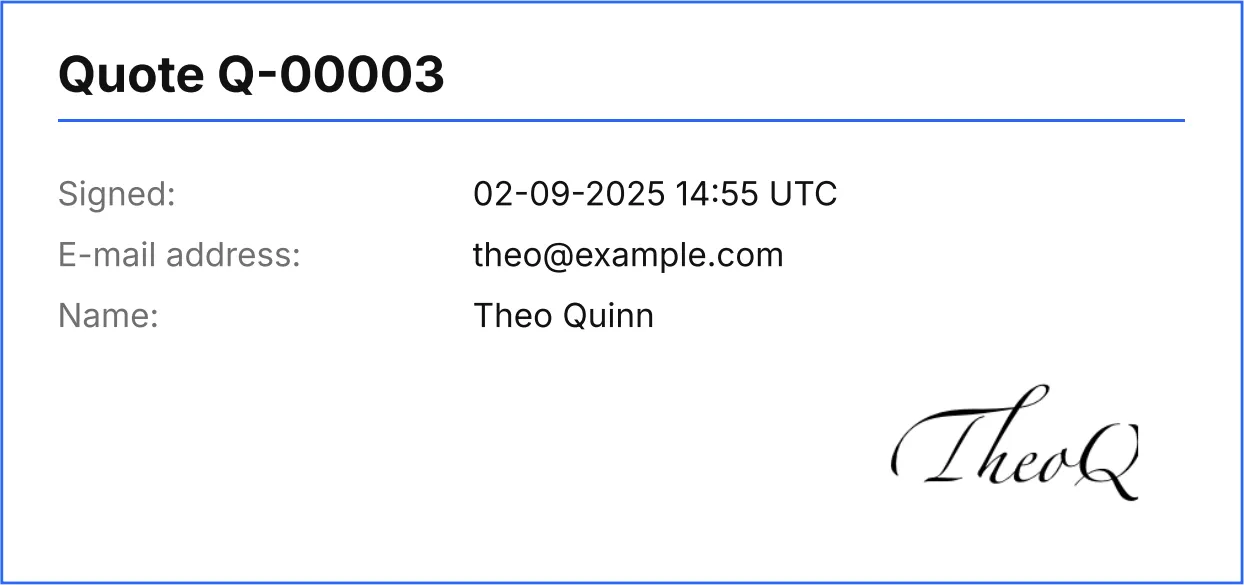
When `signature_required` is `true` for a quote, a request to POST /receivables/\{receivable\_id}/accept must include the `signature` object containing the signee's email address, name, and signature image.
The `signature_image` field must be a Base64-encoded PNG image of the signee's signature.
```sh
curl -X POST 'https://api.sandbox.monite.com/v1/receivables/e9a25c...8c47/accept' \
-H 'X-Monite-Version: 2023-09-01' \
-H 'X-Monite-Entity-Id: ENTITY_ID' \
-H 'Authorization: Bearer ACCESS_TOKEN' \
-H 'Content-Type: application/json' \
-d '{
"signature": {
"email": "theo@example.com",
"full_name": "Theo Quinn",
"signature_image": "... base64-encoded PNG image ..."
}
}'
```
Additionally, if the entity setting [document\_rendering.quote.display\_signature](../../api/entities/patch-entities-id-settings#request.body.document_rendering.quote.display_signature) is `true`, the PDF quote is automatically updated to include the signature specified when the quote was accepted.
This setting can be overridden for individual quotes.
### Accept quotes using QR codes \[#qr-code]
The field `quote_accept_page_url` defines a link to a page that can be accessed to accept the quote. When `quote_accept_page_url` is specified, the quote will include a QR code representing the provided URL. Monite's partners must implement and host this page on their side.
The default value of `quote_accept_page_url` is `https://monite.com`.
## Decline a quote \[#decline]
If the customer declined the quote, call [`POST /receivables/{quote_id}/decline`](../../api/receivables/post-receivables-id-decline) to mark the quote as `declined`. As a best practice, customers should provide a reason why they declined the quote. This reason can be specified in the `comment` field in the request body. If no `comment` is available, you can omit the request body.
```sh
curl -X POST 'https://api.sandbox.monite.com/v1/receivables/e9a25c...8c47/decline' \
-H 'X-Monite-Version: 2023-09-01' \
-H 'X-Monite-Entity-Id: ENTITY_ID' \
-H 'Authorization: Bearer ACCESS_TOKEN' \
-H 'Content-Type: application/json' \
-d '{"comment": "Thanks for the quote, but we decided to go with another vendor."}'
```
## Customize quote numbering \[#numbering]
Quote numbers are customized in the entity settings. Customizing a quote number will affect all quotes subsequently issued by the entity. The `document_id` on previously issued quotes will not be affected by this change. To customize quote numbering, make a `PATCH` request to the `/entities/{entity_id}/settings` endpoint as shown:
```sh
curl -X PATCH 'https://api.sandbox.monite.com/v1/entities/5b031d0c...44df31ebf0db/settings' \
-H 'X-Monite-Version: 2023-09-01' \
-H 'Authorization: Bearer YOUR_PARTNER_TOKEN' \
-H 'Content-Type: application/json' \
-d '{
"document_ids": {
"include_date": true,
"min_digits": 3,
"document_type_prefix": {
"quote": "QU",
},
"next_number": {
"quote": "10",
}
}
}'
```
For more information on customizing quote numbering, see [Document number customization](../../advanced/document-number-customization).
## Create an invoice based on the quote \[#create-invoice-from-quote]
If the customer accepts the quote, you can create an invoice based on this quote after the goods or services have been delivered.
To create an invoice from a quote, call [`POST /receivables`](/v2023-09-01/api/receivables/post-receivables) and provide the quote ID in the `based_on` field in the request body:
```sh
curl -X POST 'https://api.sandbox.monite.com/v1/receivables' \
-H 'X-Monite-Version: 2023-09-01' \
-H 'X-Monite-Entity-Id: ENTITY_ID' \
-H 'Authorization: Bearer ACCESS_TOKEN' \
-H 'Content-Type: application/json' \
-d '{
"type": "invoice",
"based_on": "e9a25ceb-003d-4c82-9e90-5d568ccd8c47"
}'
```
> **Tip**
>
> Invoices can be created not only from `accepted` quotes, but also from any other quote states, even `declined`.
The request above creates a new [draft](../invoices/index#draft) invoice with a copy of the quote data (that is, with the same line items and counterpart). The ID and document number of the original quote are saved in the `based_on` and `based_on_document_id` properties, respectively:
```json
{
"type": "invoice",
"id": "b21c80f9-18c0-40ce-be6b-89ddcc4d8ad9",
"created_at": "2022-05-19T06:04:29.499753+00:00",
"updated_at": "2022-05-19T06:04:30.976539+00:00",
"currency": "EUR",
"subtotal": 5000,
"total_amount": 5900,
"line_items": [ ... ],
...
"status": "draft",
"based_on": "e9a25ceb-003d-4c82-9e90-5d568ccd8c47",
"based_on_document_id": "Q-00015",
"payment_terms": null
}
```
Next, update the created draft invoice and add other necessary information, such as:
* `payment_terms_id` - [payment terms](../../common/payment-terms) that define the invoice due date and, optionally, early payment discounts;
* `entity_vat_id_id` - entity [VAT ID](../../entities/vat-ids) to be displayed on the invoice;
* `payment_reminder_id` - [payment reminder](../invoices/payment-reminders) configuration for this invoice. Required if [entity setting](/v2023-09-01/api/entities/get-entities-id-settings) `reminder.enabled` is `true`.
> **Info**
>
> For a complete list of fields that can be updated in draft invoices, refer to the description of the [`PATCH /receivables/{receivable_id}`](/v2023-09-01/api/receivables/patch-receivables-id) endpoint.
```sh
curl -X PATCH 'https://api.sandbox.monite.com/v1/receivables/b21c80...8ad9' \
-H 'X-Monite-Version: 2023-09-01' \
-H 'X-Monite-Entity-Id: ENTITY_ID' \
-H 'Authorization: Bearer ACCESS_TOKEN' \
-H 'Content-Type: application/json' \
-d '{
"invoice": {
"payment_terms_id": "411d9079-02af-476d-8723-4789882e01c3",
"entity_vat_id_id": "cb6c1c38-fdae-48f8-8e51-2d50d116b882"
}
}'
```
The invoice due date is calculated automatically based on the creation date and payment terms and is returned in the `due_date` field on the invoice response object.
```json
{
"type": "invoice",
"id": "b21c80f9-18c0-40ce-be6b-89ddcc4d8ad9",
"created_at": "2022-05-19T06:04:29.499753+00:00",
...
"due_date": "2024-06-18",
"payment_terms": {
"id": "411d9079-02af-476d-8723-4789882e01c3",
"name": "Net 30",
"description": "The payment is due within 30 days after the invoice issue date.",
"term_final": {
"number_of_days": 30,
"end_date": "2022-06-18"
}
}
}
```
Finally, you can [download the quote as PDF](./create#download-pdf) and send it to the customer via email.
## Clone a quote \[#clone]
You can clone a quote of any status by sending a `POST` request to the [`/receivables/{receivable_id}/clone`](/v2023-09-01/api/receivables/post-receivables-id-clone) endpoint. Cloning a quote copies the updated entity and counterpart information associated with the quote.
```sh
curl -X POST 'https://api.sandbox.monite.com/v1/receivables/411dc6eb...6289b3/clone' \
-H 'X-Monite-Version: 2023-09-01' \
-H 'X-Monite-Entity-Id: ENTITY_ID' \
-H 'Authorization: Bearer ACCESS_TOKEN'
```
A successful request returns an object with the newly cloned quote details.
> **Info**
>
> All newly cloned quotes will have a `draft` status regardless of the status of the original quote they were cloned from. Therefore, all previously updated values related to issuing the original quote will be reset.
## Quote expiration \[#expiration]
After a quote's `expiry_date` has passed, the quote status automatically becomes `expired`. Expired quotes cannot be accepted or declined. If needed, you can create a fresh quote for the same counterpart.
## Delete a quote \[#delete]
Draft quotes can be deleted by calling [`DELETE /receivables/{receivable_id}`](/v2023-09-01/api/receivables/delete-receivables-id). It's important to note that this action is irreversible, and once deleted, the quotes can no longer be accessed.
```sh
curl -X DELETE 'https://api.sandbox.monite.com/v1/receivables/411dc6eb...6289b3' \
-H 'X-Monite-Version: 2023-09-01' \
-H 'X-Monite-Entity-Id: ENTITY_ID' \
-H 'Authorization: Bearer ACCESS_TOKEN'
```
> **Info**
>
> Only quotes in the `draft` status can be deleted successfully. Attempting to delete a quote with any other status will throw an error.
## List all quotes \[#list-all]
To get a list of all quotes generated by an entity, call [`GET /receivables?type=quote`](/v2023-09-01/api/receivables/get-receivables):
```sh
curl -X GET 'https://api.sandbox.monite.com/v1/receivables?type=quote' \
-H 'X-Monite-Version: 2023-09-01' \
-H 'X-Monite-Entity-Id: ENTITY_ID' \
-H 'Authorization: Bearer ACCESS_TOKEN'
```
You can [sort and filter](/v2023-09-01/api/concepts/pagination-sorting-filtering#sorting) the results by the amount, counterpart name, and other fields. For the full list of available sort and filter parameters, see the description of the [`GET /receivables`](/v2023-09-01/api/receivables/get-receivables) endpoint.
Some examples:
* `GET /receivables?type=quote&counterpart_name=Acme%20Inc.` - get all quotes issued to Acme Inc.
* `GET /receivables?type=quote&amount__gte=15000` - get all quotes where the total amount is €150 or more.
* `GET /receivables?type=quote&status__in=draft&status__in=issued` - get all draft and issued quotes.
* `GET /receivables?type=quote&created_at__gte=2022-01-01T00%3A00%3A00` - get all quotes created on or after January 1, 2022.
## Retrieve a quote
To get information about a specific quote, call [`GET /receivables/{receivable_id}`](/v2023-09-01/api/receivables/get-receivables-id) and provide the quote ID.
## Find invoices created from a quote
To check if there are invoices created from a specific quote, call `GET /receivables?based_on=QUOTE_ID`:
```sh
curl -X GET 'https://api.sandbox.monite.com/v1/receivables?based_on=e9a25ceb-003d-4c82-9e90-5d568ccd8c47' \
-H 'X-Monite-Version: 2023-09-01' \
-H 'X-Monite-Entity-Id: ENTITY_ID' \
-H 'Authorization: Bearer ACCESS_TOKEN'
```
The `data` array in the response contains a list of related invoices, if any:
```json
{
"data": [
{
"type": "invoice",
"id": "b21c80f9-18c0-40ce-be6b-89ddcc4d8ad9",
...
}
],
"prev_pagination_token": null,
"next_pagination_token": null
}
```