

Quote lifecycle
Companies can issue price quotes to potential customers to specify how much the products or services will cost. Quotes serve as a formal offer before the actual purchase.
Quote statuses
Quotes move through different statuses from the time they are created to when they are accepted or declined.
Monite API provides a flexible quote workflow to be managed by each entity and their respective entity users. The entities can control access to quotes based on the role assigned to each employee through the user hierarchy.
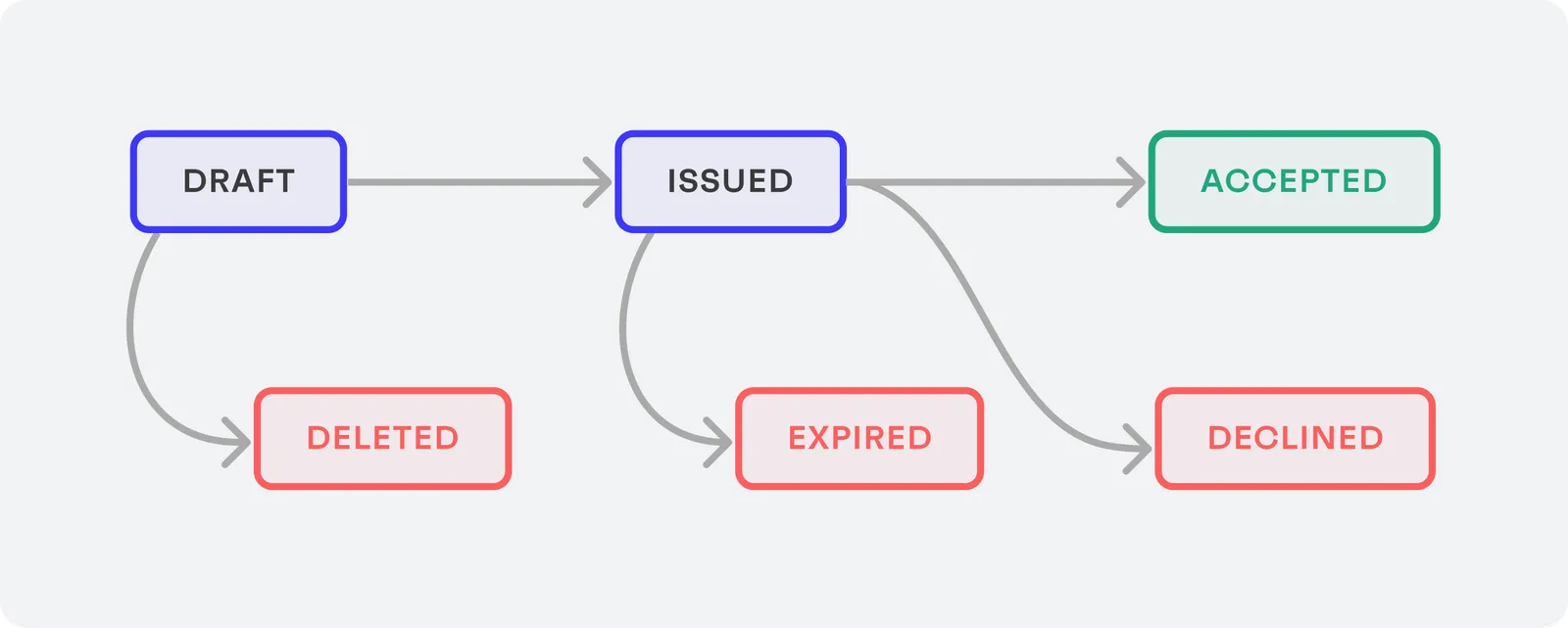
Draft
This is the initial status for all newly created quotes. A draft quote is a quote that has not yet been issued by entity. Draft quotes can be updated at anytime.
Draft quotes can transition to issued or be deleted.
Issued
Indicates that the quote has been finalized and issued to a counterpart. An issued quote cannot be deleted, just accepted or declined. Issued quotes can also expire.
Issued quotes do not state how the quote has reached the counterpart. It is necessary to define the channels:
- Postal: downloaded and manually distributed + updated manually in the platform.
- Email: send via platform, either Monite email service or Partner integrated email service.
- B2B & B2G platforms.
Accepted
Indicates that the counterpart has accepted the quote. This means the counterpart agrees with the quoted price and wants to place an order. Only issued quotes can be accepted.
The next step would be to create an invoice based on the accepted quote.
Declined
Issued quotes can be declined. For example, a counterpart can decline a quote if they decide to go with another vendor.
This is a final state, i.e., declined quotes cannot be accepted or deleted, but can still be viewed.
Expired
Issued quotes automatically expire when they reach the expiry_date. Expired quotes can no longer be accepted or declined, but can still be viewed. This is a final state.
Deleted
Only draft quotes can be deleted. Deleted quotes can no longer be accessed.