

Monite account structure
Overview
The Monite API uses different layers to secure access to any stored data within the platform:
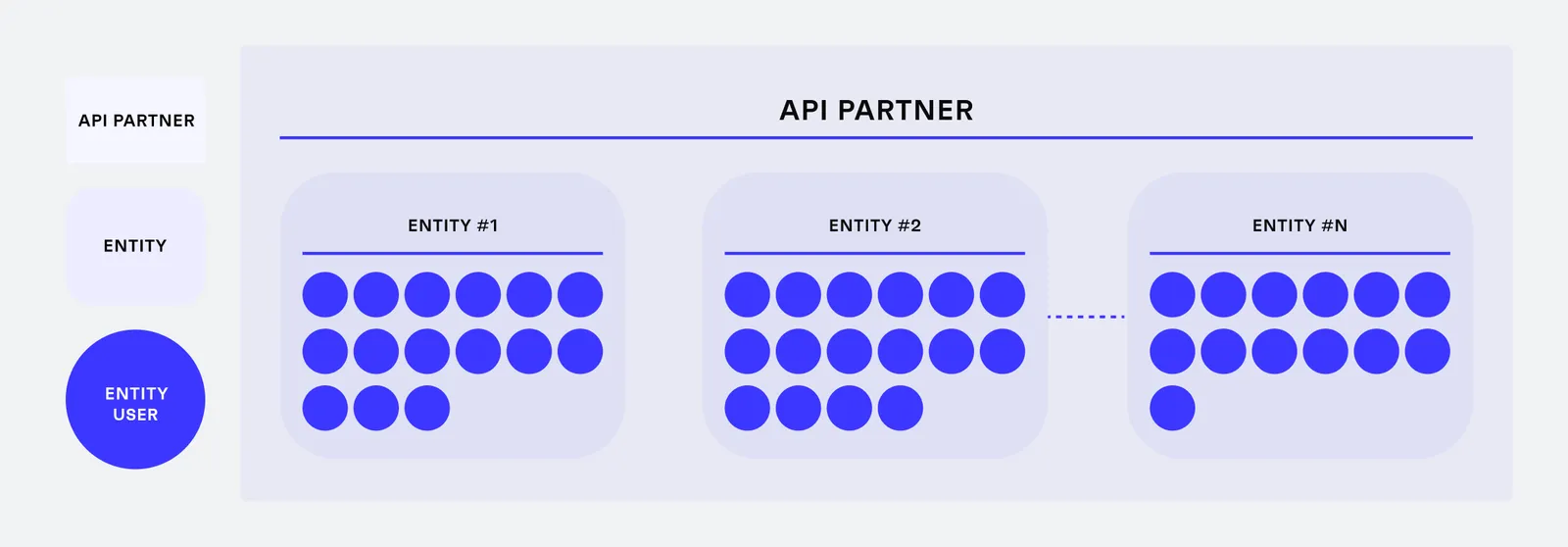
Partner
A partner is a company that implements Monite API in its app or platform. This is a mandatory layer.
The development teams of the partners connect to Monite API with admin-level access tokens. These admin tokens enable partners to create and configure entities and access all resources of all entities they develop software for.
Entity
A customer of a partner – an entity – is either an organization or an individual. Each partner develops for one or more entities. With the ID of an entity is possible to obtain root access to all resources related to this specific entity only.
For example, Beispiel GmbH and Example Inc are both customers of NeobankA. Tokens issued for Beispiel GmbH only give access to the resources associated with Beispiel GmbH. Access to Example Inc. is not possible.
Entity user
The employees who work for an entity - this optional entity user access layer is for partners who want to use Monite security for rapid development rather than build their own custom access control logic.
Using Monite API, partners create customizable entity-level roles and permissions. Monite automatically monitors access policies for each API call.
For example, Maria is an accountant at Beispiel GmbH. Maria’s access token gives access to resources within Beispiel GmbH according to Maria’s permissions.
Connect entities
Partners must map each customer as an entity into Monite before they can execute any business operations. This prevents any data incidents between entities and ensures that each entity can access only its own data.
Each entity registers its operations and stores financial documents such as payables or bank transactions in an interface developed by the Partner. These documents are stored and processed by Monite in a dedicated and secure space.
Connect entity users
Partners may need to implement Role-Based Access Control (RBAC) to meet the needs of entities and entity users. The main purposes of user roles are:
- Restrict access to sensitive data and actions: Secure different levels of company information from different roles or prevent specific roles from completing tasks such as executing payments in the name of the entity.
- Delegate tasks among coworkers: These tasks automatically respect information and role security.
- Monitor system changes: Check who added information or changed entity data in Monite.
For more information on existing roles, refer to Authentication
It’s up to partners to thoroughly review their user flows and use cases and define specific roles and permissions.
Accounts Payable example roles
Below are some examples how these roles might look like for Accounts Payable:
- Administrator: Superuser for financial processes. Administrators are also involved in user management.
- Power user: Superuser for financial processes.
- Approver: Sends payables and participates in approval policies.
- Sender: Submits payables to Monite.
- Accountant: Reconciles transactions with payables and exports files for accounting.
The following table describes the user rights that partners can parameterize and the recommended access level for each role:
Accounts Receivable example roles
Below are some examples how these roles might look like for Accounts Receivable:
- Administrator: Superuser for financial processes. Administrators are also involved in user management.
- Power user: Superuser for financial processes.
- Sender: Creates and issues any document.
- Accountant: Reconciles transactions with receivables and exports files for accounting.
The following table describes the corresponding user rights: