

Credit notes
Overview
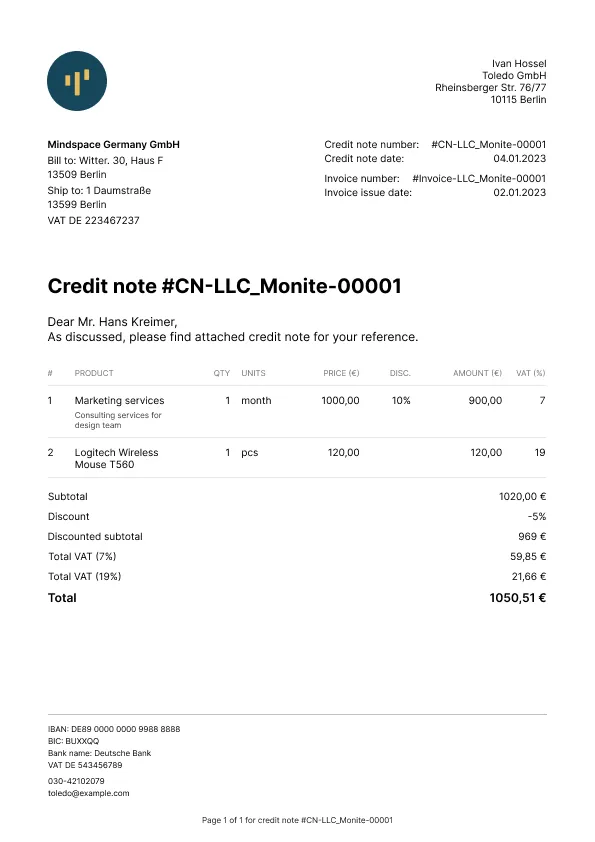
A credit note, also known as a credit memo, is a legal document used to reduce the amount owed on an invoice after it was issued. Entities would typically use credit notes in the following cases:
- An issued invoice contains a mistake (for example, wrong product or quantity).
- The order needs to be changed after the invoice has been issued.
- The order was canceled by the entity or the customer (counterpart).
Credit notes can be used to partially reduce the invoice amount as well as fully cancel an invoice.
Multiple credit notes can be issued for the same invoice. However, the total amount credited cannot exceed the invoice amount.
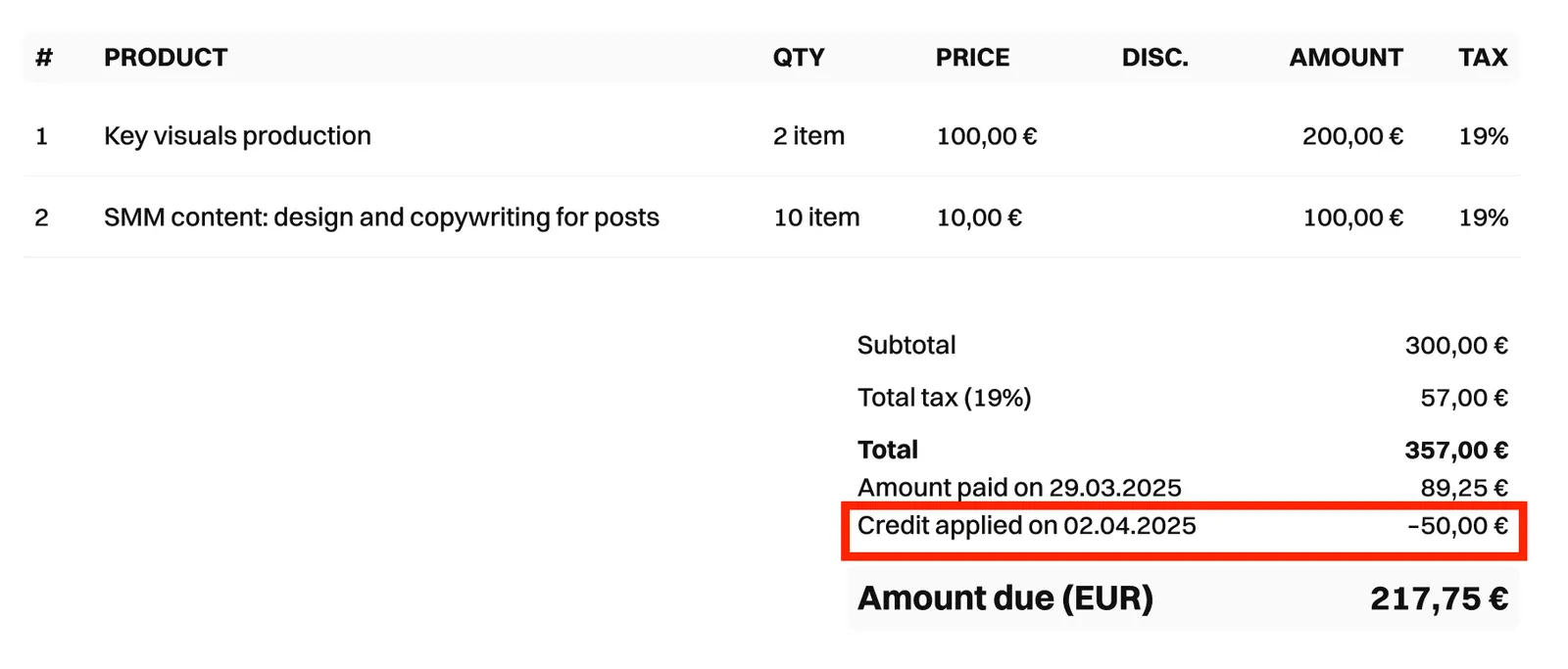
You can also configure PDF invoices to include information about credit notes applied.
To do this, enable the entity setting generate_paid_invoice_pdf.
Roles and permissions
To create and manage credit notes using an entity user token, this entity user must have a role with the receivables permission.
If a partner-level token is used, no special permissions are needed.
Use cases
Monite API supports the following use cases for credit notes:
- Reduce quantities of line items.
Example: an invoice was issued for 10 laptops, but only 8 were actually delivered. A credit note can “cancel” the remaining 2 laptops that were not delivered. - Reduce the price of some or all units within a line item. (Essentially applying a discount.)
Example: A product was mistakenly billed as € 210 instead of € 200. A credit note can correct the price back to € 200. - Credit the full remaining amount of an invoice. This cancels an unpaid invoice, or marks a partially paid invoice as paid.
Credit notes cannot add new line items or increase the unit quantity and price in line items. Instead, the entity should issue a new invoice for the additional amount.
Considerations and limitations
- Credit notes can be created only for invoices in the
issued,partially_paid, andoverduestatuses. Creditingpaidinvoices is not supported. - Credit notes for overdue and partially paid invoices can be used to reduce only the quantity of line items, but not the unit prices.
- If a credit note cancels the full remaining amount of an invoice:
issuedand unpaidoverdueinvoices are automatically moved to thecanceledstatus,partially_paidand partially paidoverdueinvoices are automatically moved to thepaidstatus.
- Changing line item VAT rates via credit notes is not supported.
- If the original invoice contained any form of discounts or special deductions, you can only issue a credit note once. Partial adjustments of discounted invoices via credit notes are not supported.
- If an invoice includes several line items for the same product, credit notes cannot be used to update those specific line items. However, other line items on the invoice can be updated.
- If a counterpart’s address or contact information was changed after an invoice was issued, you can provide the updated counterpart address or contact information via a credit note. However, the updated information will only appear in the credit note; the information in the original invoice is not changed.
Credit note lifecycle
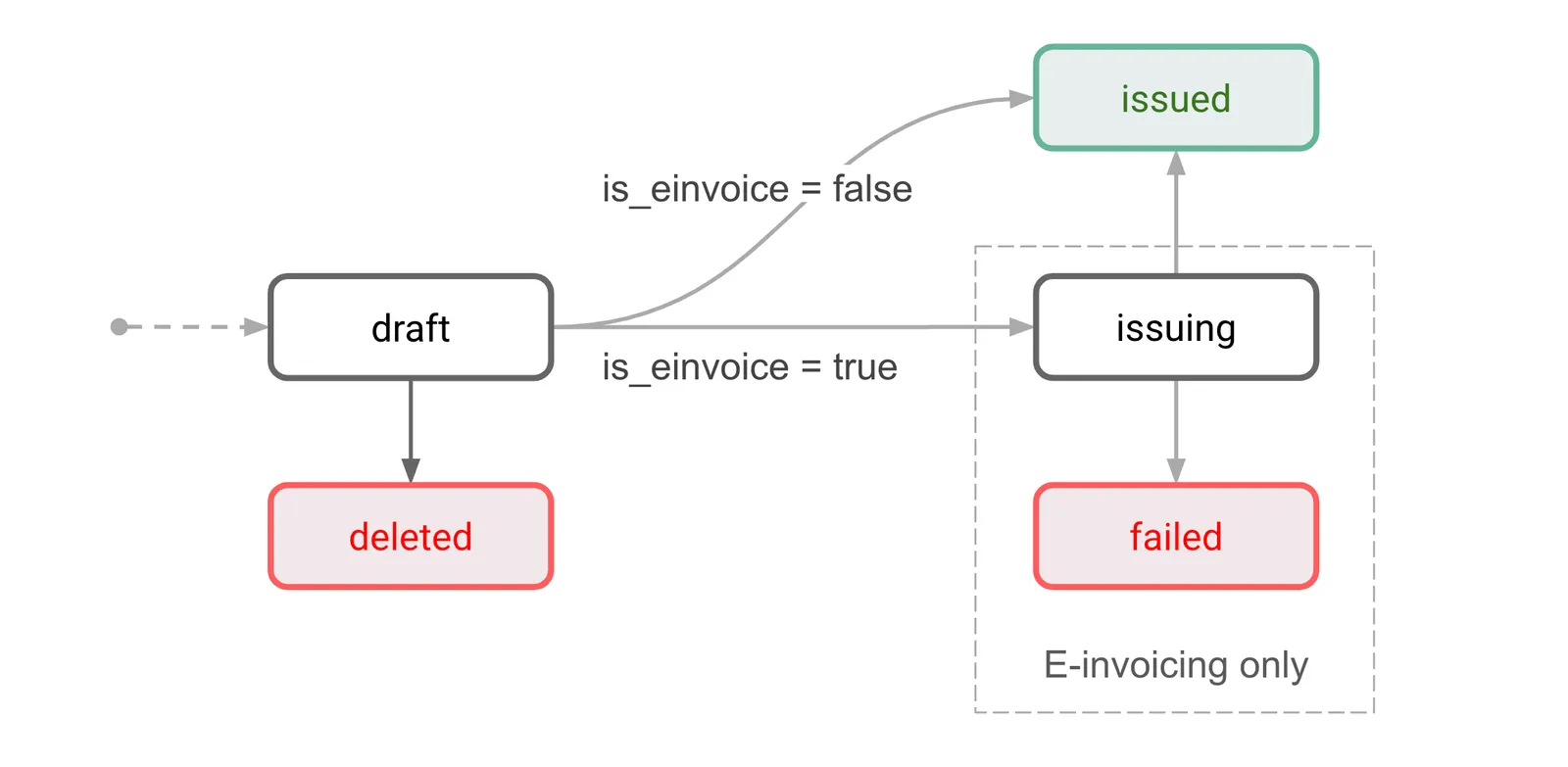
Credit notes can have one of two statuses, draft or issued.
Draft credit notes can be deleted. Deleted documents can no longer be accessed via the API.
Draft
This is the initial status for all new credit notes. A draft credit note is not issued yet and can still be edited.
Draft credit notes can be either issued or deleted.
Only one draft credit note can exist per invoice. Before you can create the second draft credit note for the same invoice, you need to issue (or delete) the previous draft credit note.
Issued
This status indicates that the credit note has been finalized and issued to a counterpart.
Ways to create a credit note
There are two ways to create credit notes:
- Create a credit note directly. Use this to manually adjust the credited amount (for example, to credit a partial amount).
- Cancel an invoice. If the entity setting
receivable_edit_flowis “compliant”, a new credit note will be automatically created and issued for the remaining invoice amount.
Credit notes are not automatically sent to counterparts. Use POST /receivables/{credit_note_id}/send to send credit notes via email.
Create a credit note manually
For the full remaining invoice amount
To create a credit note, call POST /receivables and specify the invoice ID in the based_on field in the request body:
This creates a draft credit note with a copy of invoice data. The response contains the id assigned to the credit note. The based_on and based_on_document_id properties of the credit note point to the original invoice:
Full credit note response
By default, a newly created credit note cancels the full remaining amount of an invoice. If this is what you need, you can proceed to issue the credit note.
For a partial amount
The first step is the same as when creating a full amount credit note - call POST /receivables and specify the invoice ID in the based_on field in the request body:
This returns the id assigned to the created draft credit note:
The next step is to adjust the line item quantities and prices as needed. To do this, call PATCH /receivables/{credit_note_id} and provide the updated values. The general PATCH request format for credit notes is as follows.
Notes:
- The structure of the
line_itemsfield in credit notePATCHrequests differs from that in invoice objects. - The
quantityfield represents the number of products you want to remove or apply a discount via the credit note. This number must always be less than or equal to the current total on the invoice object. - The
price_difffield defines the discount on the product. It represents the amount to be deducted from the current price on the invoice. - The
old_pricefield defines the price of a previously discounted product. This field should only be used when applying a further discount on a product item.
Example 1: Reduce line item quantity
Consider an invoice line item object with product ID 9ccaf14e-c14d-48eb-8801-4217d52b6114, the price is 5 EUR (500 in minor units), and the quantity is 10.
To reduce the product quantity from 10 to 8 (in other words, to remove 2 items), update the credit note data as follows:
Example 2: Reduce the unit price of a line item
Consider an invoice line item object with product ID 9ccaf14e-c14d-48eb-8801-4217d52b6114, the price is 5 EUR (500 in minor units), and the quantity is 10.
To reduce the unit price from 5 to 4 EUR, update the credit note data as follows:
A successful request applies a discount of 1 EUR (100 in minor units) to all 10 products on the invoice line item.
Example 3: Reduce the price of some units within a line item
Consider an invoice line item object with product ID 9ccaf14e-c14d-48eb-8801-4217d52b6114, the price is 5 EUR (500 in minor units), and the quantity is 10.
Suppose you want to reduce the price of 2 units from 5 to 4 EUR. The other 8 units should keep the original price. To achieve this, update the credit note data as follows:
A successful request applies a discount of 1 EUR (100 in minor units) to 2 of the 10 products on the invoice line item. No change applies to the remaining 8 products on the invoice line item.
Example 4: Apply a further discount to an already discounted item
Consider an invoice line item object with product ID 9ccaf14e-c14d-48eb-8801-4217d52b6114, the price is 5 EUR (500 in minor units), and the quantity is 10.
Suppose you had already reduced the price of 2 items from 5 EUR to 4 EUR (400 in minor units). Now, you want to further reduce the price of 2 units from 4 EUR to 2 EUR. To achieve this, update the credit note data as follows:
Issue a credit note
Once the credit note details have been finalized, you can mark the credit note as issued. To do this, call POST /receivables/{credit_note_id}/issue:
When a credit note is issued, the following happens:
- The credit note
statusis changed to"issued". - A document number is generated for the credit note in the format
CN-<number>and is stored in thedocument_idfield for tracking purposes. - The
issue_dateis set to the current date. - The credit note becomes read-only and can no longer be edited.
Issuing a credit note also updates the reconciliation amounts on an invoice and may trigger a status change on the invoice.
If needed, additional credit notes can be created for the same invoice if it still has a remaining amount due.
Issuing a credit note does not automatically send it to the counterpart. See the Send a credit note via email section below to learn how to send credit notes.
Download a credit note as PDF
Monite automatically generates the PDF version of credit notes. The PDF file details—URL, file size, MD5 hash, and other information—are returned in the file object property in the credit note response:
If file is returned as null, repeat the request to GET /receivables/{credit_note_id} after some time.
If you need just the PDF file link without the full credit note details, call GET /receivables/{credit_note_id}/pdf_link:
It returns the following response:
The PDF file is updated automatically if the credit note data is changed.
Customize the PDF file
Monite provides several built-in PDF templates for receivables. Entities can change their default template or customize their chosen templates at any time. For more information, see PDF templates.
Send a credit note via email
Both draft and issued credit notes can be sent via email. Sending a draft credit note also automatically issues it.
To send a credit note to a counterpart via email, call POST /receivables/{credit_note_id}/send and provide the email subject and body text. The language field determines the language of the email template used to send the credit note. If a value is not provided, it defaults to en.
Monite also allows you to provide a list of email addresses to which you can send the credit note. You can also include other email addresses to which you can send a copy or a blind copy of the credit note, as shown:
The subject_text and body_text fields are email template variables that represent the email subject and body. For more information, see Create and manage email templates.
The To email address is taken from the Counterpart object associated with the credit note. This address is also returned in the counterpart_contact.email field of the Receivable object that represents the credit note.
All credit note emails are sent from the noreply@monite.com email address by default. You can customize the email domain name—@exampleCompany.com— by configuring a mailbox for the entity. You can also customize the email sender name and username by updating your Monite partner settings. For more information, see Update partner settings.
A 200 OK response from POST /receivables/{credit_note_id}/send means the email was successfully sent from the Monite email server.
Resend a credit note
To resend a credit note, you can call POST /receivables/{credit_note_id}/send again, optionally with different subject_text and body_text templates.
Resending a credit note does not change its issued_date.
Miscellaneous
List all credit notes
To list all credit notes, call GET /receivables?type=credit_note. You can optionally filter the returned results by the credit note status or other parameters.
Find all credit notes for an invoice
To get a list of credit notes created for an invoice, call GET /receivables?type=credit_note&based_on=INVOICE_ID:
The results include both draft and issued credit notes (if any) created for that invoice:
Alternatively, if you need just the credit note IDs without other data, examine the related_documents.credit_note_ids field in an invoice: