For AI agents: a documentation index is available at the root level at /llms.txt and /llms-full.txt. Append /llms.txt to any URL for a page-level index, or .md for the markdown version of any page.
API StatusPartner Portal
HomeGuidesAPI ExplorerSDKsGitHubSupport
  • Monite SDK
    • Overview
  • Drop-in
    • Drop-in overview
    • Drop-in theming
    • Drop-in localization
    • Iframe App
  • React SDK
    • Overview
      • Overview
      • ApprovalPolicies
      • ApprovalPoliciesTable
      • ApprovalPolicyDetails
      • ApprovalRequests
      • ApprovalRequestsTable
      • CounterpartDetails
      • Counterparts
      • CounterpartsTable
      • CreditNotesTable
      • DocumentNumber
      • InvoiceDetails
      • InvoicesTable
      • LayoutAndLogo
      • Onboarding
      • OtherSettings
      • PayableDetails
      • Payables
      • PayablesTable
      • ProductDetails
      • Products
      • ProductsTable
      • QuotesTable
      • Receivables
      • ReceivablesTable
      • RolesAndPolicies
      • TagFormModal
      • Tags
      • TagsTable
      • TemplateSettings
      • UserRoleDetails
      • UserRoles
      • UserRolesTable
    • SDK customization
    • SDK localization
    • SDK theming
    • SDK releases
    • v4 migration guide
LogoLogo
API StatusPartner Portal
On this page
  • Overview
  • Permissions
  • Preview
  • Usage
  • Props
React SDKComponents and wrappers

ProductsTable component

Was this page helpful?
Previous

QuotesTable component

Next
Built with

Overview

The ProductsTable component renders a table that displays the list of existing products of the authenticated entity. The component supports searching, filtering, and pagination between these products.

Permissions

To access this component, the entity user must have read permissions for the product object. For more information, see List of permissions.

Preview
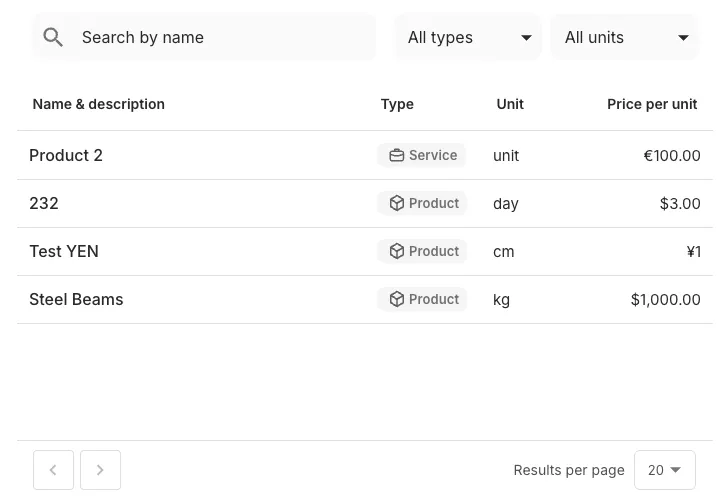
ProductsTable component preview
You can move and organize the columns of the table the way you prefer.

Usage

Use in the ProductsTable component in your application as shown:

React.js
1import { ProductsTable } from "@monite/sdk-react"
2
3...
4
5// TODO: This component must be rendered within the MoniteProvider wrapper
6 const ProductsTablePage = () => {
7 return <ProductsTable />
8};

Props

The following table shows all ProductsTable component properties, their types, and descriptions:

PropTypeDescription
onEditfunctionThis callback can be triggered when a product is edited.
onDeletedfunctionThis callback can be triggered when a product is deleted.
onFilterChangedfunctionThis callback is triggered when the filtering options are changed. You can filter products by type or measure_unit_id.
onSortChangedfunctionThis callback is called when the current sorting order for any column is changed. It returns the newly sorted field and order.
onRowClickfunctionThis callback takes the identifier of the clicked row as a parameter and is triggered when a product table row is clicked.

The onChangeSort takes one argument whose value is an object with the following fields:

  • sort - the field name of column whose sort order was changed. For example, name.
  • order - the new sort order, either asc or desc.
1(
2 "sort": "name",
3 "order": "asc" | "desc" | null
4) => void