For AI agents: a documentation index is available at the root level at /llms.txt and /llms-full.txt. Append /llms.txt to any URL for a page-level index, or .md for the markdown version of any page.
API StatusPartner Portal
HomeGuidesAPI ExplorerSDKsGitHubSupport
  • Monite SDK
    • Overview
  • Drop-in
    • Drop-in overview
    • Drop-in theming
    • Drop-in localization
    • Iframe App
  • React SDK
    • Overview
      • Overview
      • ApprovalPolicies
      • ApprovalPoliciesTable
      • ApprovalPolicyDetails
      • ApprovalRequests
      • ApprovalRequestsTable
      • CounterpartDetails
      • Counterparts
      • CounterpartsTable
      • CreditNotesTable
      • DocumentNumber
      • InvoiceDetails
      • InvoicesTable
      • LayoutAndLogo
      • Onboarding
      • OtherSettings
      • PayableDetails
      • Payables
      • PayablesTable
      • ProductDetails
      • Products
      • ProductsTable
      • QuotesTable
      • Receivables
      • ReceivablesTable
      • RolesAndPolicies
      • TagFormModal
      • Tags
      • TagsTable
      • TemplateSettings
      • UserRoleDetails
      • UserRoles
      • UserRolesTable
    • SDK customization
    • SDK localization
    • SDK theming
    • SDK releases
    • v4 migration guide
LogoLogo
API StatusPartner Portal
On this page
  • Overview
  • Permissions
  • Preview
  • Usage
  • Props
React SDKComponents and wrappers

QuotesTable component

Was this page helpful?
Previous

Receivables component

Next
Built with

Overview

QuotesTable is a React component that displays all quotes created by an entity. The component shows each quote’s amount, status, issue date, validity date, and the counterpart to which they were sent.

Permissions

To access this component, the entity user must have read permissions for the receivable object. For more information, see List of permissions.

Preview
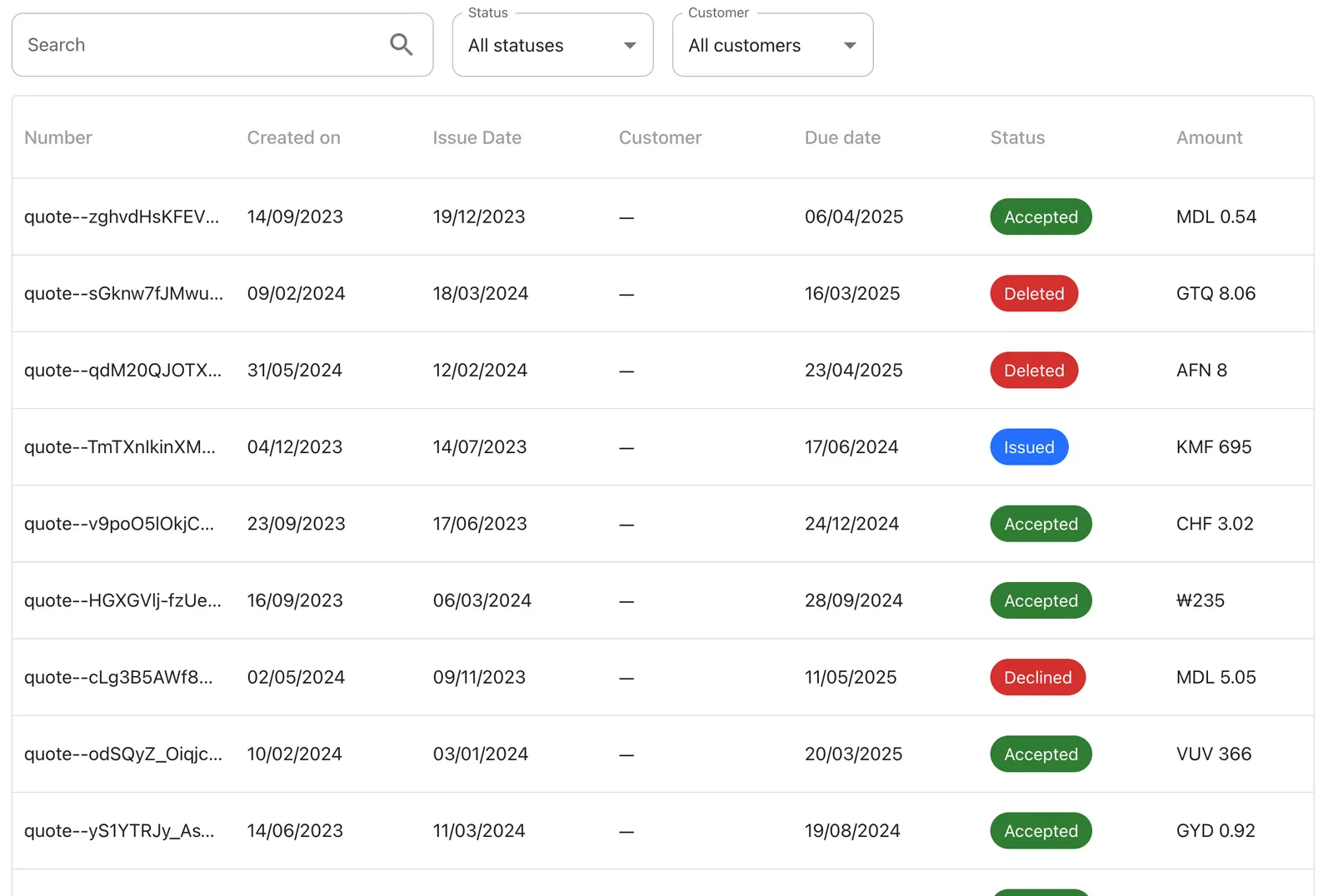
QuotesTable component preview
You can move and organize the columns of the table the way you prefer.

Usage

Use the QuotesTable component in your application as follows:

React.js
1import { QuotesTable } from "@monite/sdk-react";
2
3...
4
5// TODO: This component must be rendered within the MoniteProvider wrapper
6const QuotesTablePage = () => {
7 return <QuotesTable />
8};

Props

filters
array of string

A list of search filters to display above the data table. Each filter is defined by the name of the underlying data field. UI labels of the filter inputs are populated automatically.

The default filters are: quote number (partial match), quote status, and counterpart.

Example:

1<QuotesTable filters={[
2 "document_id__contains",
3 "status",
4 "counterpart_id"
5]} />
onChangeSort
function

This callback is called when the current sorting order for any column is changed.

onRowClick
function

This callback takes the identifier of the clicked row as a parameter and is triggered when a quotes table row is clicked.

query
object

The data query used to populate the table. The object’s fields correspond to the query parameters of the GET /receivables endpoint. The type field is required, others are optional.

Example: display only draft quotes, newest first:

1<QuotesTable query={{
2 type: "quote",
3 status: "draft",
4 sort: "created_at",
5 order: "desc"
6}} />