

Projects
Overview
Projects allow entities to aggregate and track payables, purchase orders, and receivables under the same work scope, improving spending control, resource allocation, timelines, and communication. The characteristics of the project includes start and end dates, identifier code, color, tags, and metadata.
Projects allow entities to aggregate and track payables, purchase orders, and receivables under the same work scope, improving spending control, resource allocation, timelines, and communication. The characteristics of the project includes start and end dates, identifier code, color, tags, and metadata.
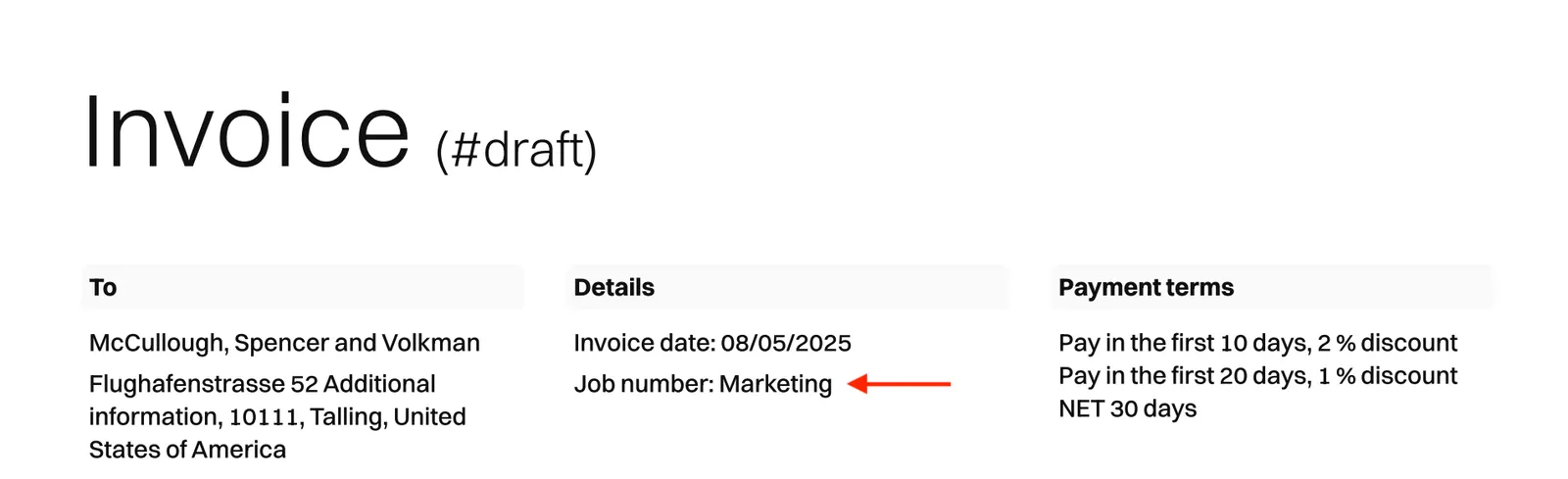
PDF receivables display the associated project name in the document header:
Roles and permissions
To use the /projects* endpoints with an entity user token, this entity user must have a role with the project permission.
If using a partner-level token, no special permissions are needed.
Create a project
To create a new project, call the POST /projects endpoint:
The successful response contains all the information about the project:
Create a document within a project
It is possible to create a new payable or receivable directly connected to a project.
- To create a payable, call
POST /payablesinforming the specificproject_idin the payload. - To create a purchase order, call
POST /payable_purchase_ordersinforming the specificproject_idin the payload. - To create a receivable, call
POST /receivablesinforming the specificproject_idin the payload.
Assign existing documents to a project
You can also assign an already existing payable or receivable to a project.
- To assign an existing payable to a project, call
PATCH /payables/{payable_id}informing the specificproject_idin the payload. - To assign an existing purchase order to a project, call
PATCH /payable_purchase_orders/{purchase_order_id}informing the specificproject_idin the payload. - To assign an existing receivable to a project, call
PATCH /receivables/{receivable_id}informing the specificproject_idin the payload.
List all documents of a project
To list all documents of a specific project, send a GET request to:
/payables?project_id={project_id}for listing all payables of a specific project./payable_purchase_orders?project_id={project_id}for listing all purchase orders of a specific project./receivables?project_id={project_id}for listing all receivables of a specific project.
Update a project
To update specific information on an existing project, call PATCH /projects/{project_id} endpoint. These are the fields that can be updated:
namedescriptionstart_dateend_datecodecolortag_ids
The successful response contains all the information about the project, including the updated fields.
List all projects
To get information about all projects associated with the specified entity, call the GET /projects endpoint.
Retrieve a project
To get information about a specific project, call the GET /projects/{project_id} endpoint.
Delete a project
To delete an existing project, call the DELETE /projects/{project_id} endpoint. The system will check for any associated payables or receivables. If any are found, a 204 - No Content response will be returned, and the project will not be deleted.